


Why this comparison matters right now
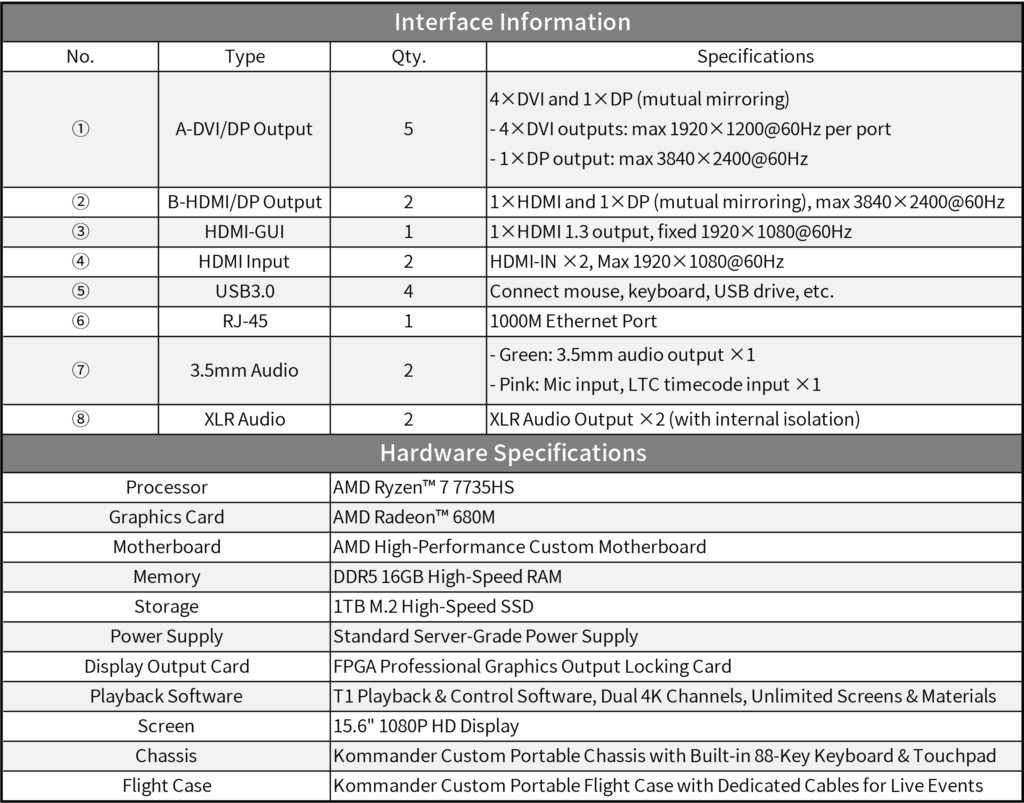
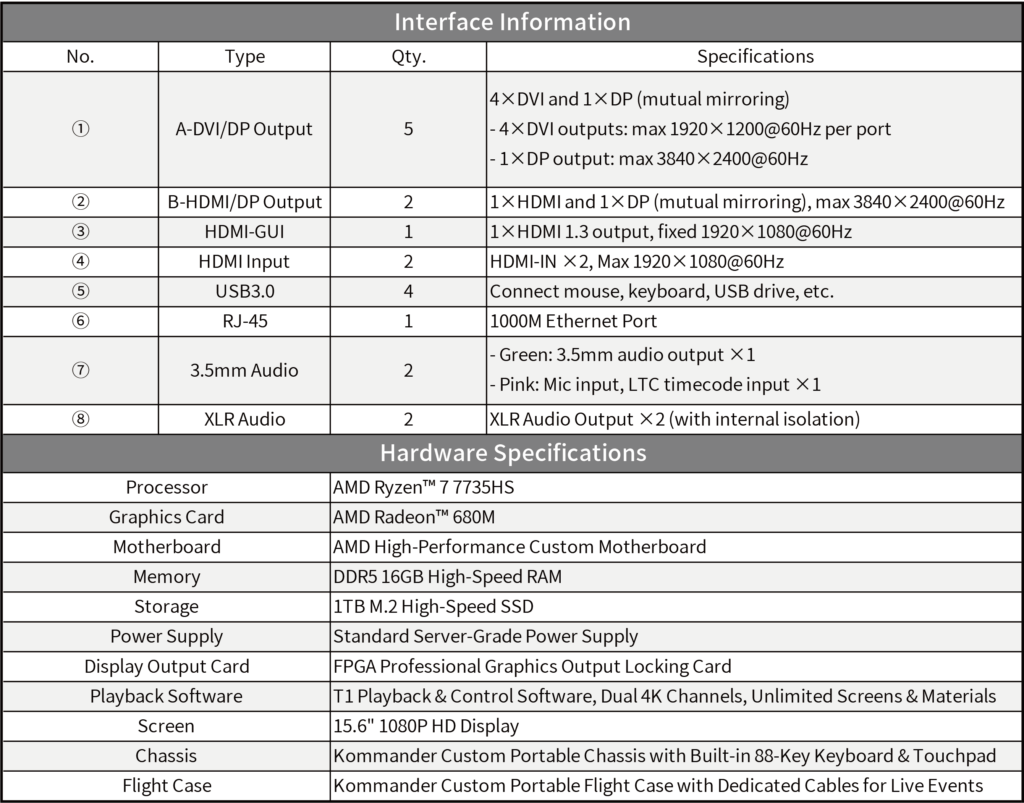
Picking the right LED control device can change a screen from “meh” to memorable. I’ll walk you through practical differences—what actually moves the needle—so you can match gear to the job. Right away: if you need synchronized playback across layers, check out this playback media server as an example of how hardware and software combine to manage timing, color, and latency for complex installs.
Top technical differences that affect daily results
Focus on three concrete specs. First, refresh rate: higher rates reduce flicker and improve motion clarity on camera, crucial for broadcast and live events. Second, pixel pitch: it decides perceived detail at viewing distance—smaller pitch for close-up exhibits, larger for stadiums. Third, video processor capability: that’s where scaling, edge blending, and HDR tone-mapping happen. Together, they determine the final image more than brand names do.
How product features map to real use-cases
Compare devices based on the intended environment. For a tradeshow booth you want low-latency inputs and simple color calibration tools. For outdoor advertising, robustness and thermal management beat flashy UI. For multi-zone installations—like layered LED walls—you need reliable timing and a playback architecture that supports multiple synchronized outputs.
Real-world anchor: what professionals actually test
Install teams that work on Times Square campaigns or stadium displays run standardized checks: sync drift over four-hour runs, color stability after thermal cycles, and pixel-level error rates under peak brightness. These field tests show whether a unit will keep harmony in a stacked setup—exactly the scenario where a multi-layer display needs tight control. The findings from those setups guide procurement choices far more than marketing slides do.
Common mistakes teams keep making
People often overspec the controller while ignoring cable and cabling topology. Or they pick a controller because it advertises “4K” without checking if its scaler preserves chroma or introduces lag—this bites you in live switching. Another slip: skipping firmware validation for each unit; dissimilar firmware across nodes creates sync jitter. —It’s small things like these that break big shows.

Quick comparison checklist
Use this short checklist when you evaluate hardware: – Input/output formats and max bandwidth (look for uncompressed pathways), – Precision of color calibration tools (per-channel LUTs, not just presets), – Timing control (frame-locked outputs and genlock support), – Environmental specs (operating temperature, MTBF), – Support for redundancy and hot-swap in mission-critical installs.
Golden rules for choosing the right solution
Here are three evaluation metrics I trust across projects. First: synchronization accuracy—measure drift in milliseconds across outputs during a prolonged playback test. Second: image fidelity—check color calibration range and HDR handling against reference material. Third: operational resilience—verify firmware consistency, remote management, and thermal tolerance under peak load. Score suppliers against these and the choice becomes obvious.
Final takeaway
Good screen performance isn’t magic; it’s the sum of refresh rate, pixel pitch, timing, and real-world testing. When you prioritize the three golden rules above, you’ll avoid common pitfalls and get predictable results. For projects that demand reliable, layered presentation and playback orchestration, vendors who combine strong hardware with coherent software ecosystems earn the win—like the approach you see from Kystar. —Solid tools, predictable outcomes.
